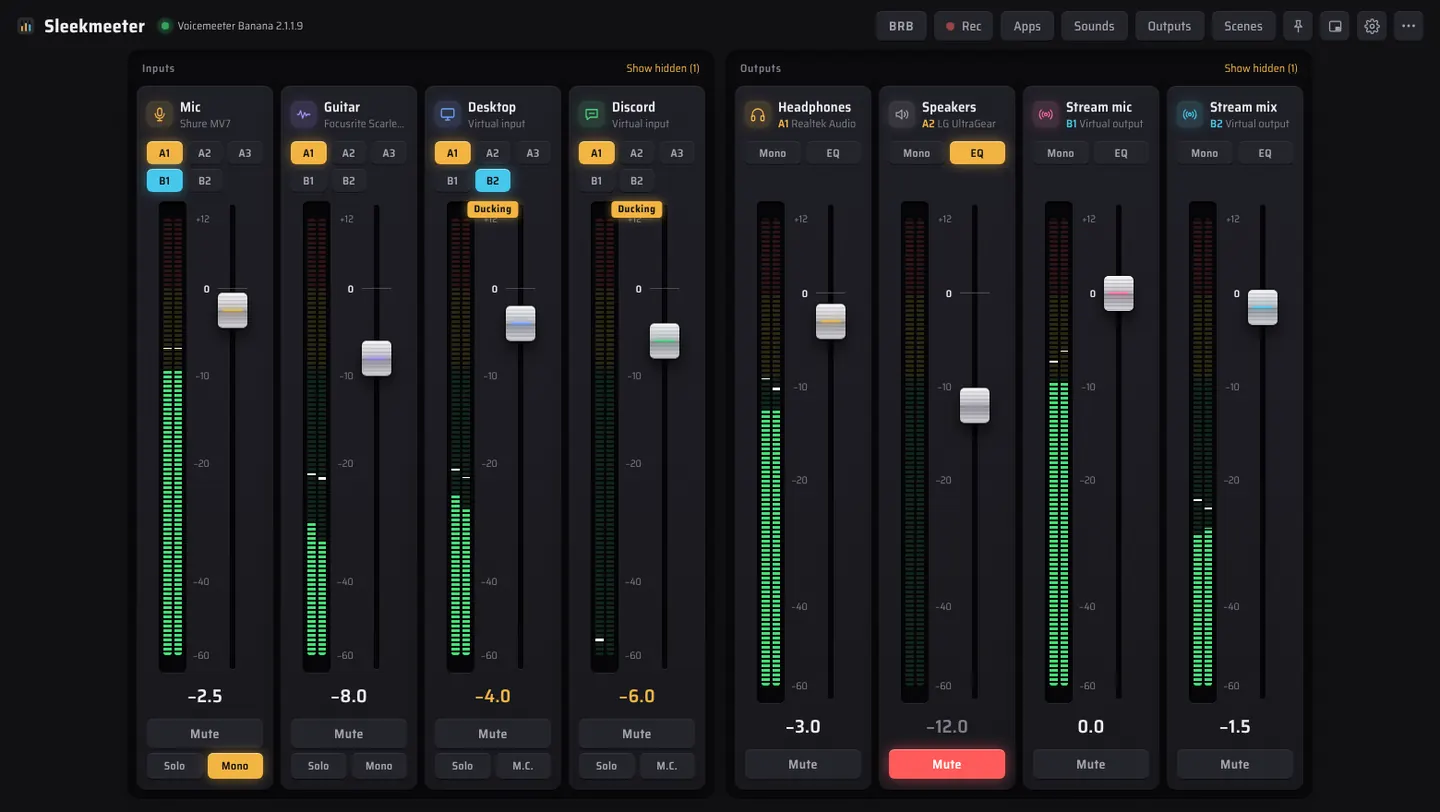
Sleekmeeter sits on top of Voicemeeter Standard, Banana and Potato and controls it through the official Remote API. Voicemeeter keeps doing the audio. You get twelve themes, fades that never click, talk-over ducking, a soundboard and a remote on your phone.
Every level change glides, and the meters show post-fader level on the same scale as the fader, so you see signal and fader position together.
Appearance
Twelve themes, to match your mood
A theme changes shapes and materials as well as colours. Faders become capsules, hearts, tick marks or starbursts, and the tray panel and volume overlay follow along.
Console
The dark hardware desk with amber light. The default.
Streaming
Run the show without leaving the game
Sounds, an on-stream overlay, chat commands and a phone remote. Everything runs from the tray while you play.
Header → Sounds
A soundboard that routes like a channel
Drop in wav, mp3, ogg or flac files and each becomes a button. Play them into a Voicemeeter virtual input and every sound gets its own fader. Give a sound a hotkey, sort sounds into groups, or turn a folder into one random-pack button.
Settings → Phone remote
The mixer in your pocket
Faders, mutes, Be right back, scenes, sounds and output profiles on any phone on your Wi-Fi. A secret key in the address keeps it yours, and nothing leaves your home network.
Settings → Phone remote · OBS Studio
An overlay that tells chat what's going on
Add one browser source in OBS and your scene shows a MUTED or BRB badge, a mic meter and the sound that just played. Connect OBS and Sleekmeeter can follow your scenes and react when you go live.
Settings → Twitch chat commands
Let your mods run the board
Add !brb, !scene and !sound, then choose who may use them: just you, you and your mods, or everyone. A cooldown stops spam.
Sleekmeeter joins chat as a silent, anonymous viewer. It never signs in and never posts.
Stream chatLive
Sleekmeeter is listening for your commands
Setup
The fiddly parts, handled
Switch devices, load a mix per game, tame app volumes and get a clean stream voice without touching Voicemeeter's own window.
Push to talk
Hold a key to open the mic. It closes a moment after you let go, so the end of a word isn't cut off. Push to mute works the other way round.
Devices that come back
Unplug USB headphones or lose Bluetooth and the audio engine restarts by itself when the device returns.
Global shortcuts
Mute, volume, scenes, sounds, recording, ducking and BRB from any app, with an on-screen level overlay.
Mic level check
Talk for eight seconds and it tells you if you're too quiet or too loud, then sets the fader for you.
Hear yourself
Records five seconds of your stream mix and plays it back, so you hear exactly what viewers hear.
Voicemeeter options
Sample rate, buffers, exclusive and swift modes and output delays without opening Voicemeeter.
Check my setup
Finds the usual problems: missing devices, shortcuts that couldn't register and a broken OBS link.
One-click updates
Downloads the new version, checks it against GitHub's checksum, installs it and reopens.
Download
Get Sleekmeeter
Free and open source under the MIT license. Pick the file that suits your PC from the latest release.
RecommendedSleekmeeter-Setup.exe
Checks for Voicemeeter and installs VB-Audio's official version first if it's missing, then installs Sleekmeeter. Restart Windows afterwards so Voicemeeter's drivers load.